
Plumbers, electricians, HVAC technicians, roofers, landscapers, and renovation contractors across Canada are discovering what a proper CRM can do for a trades business. Here is the full picture. [cite: 1434, 1435]
If you run a trades or home services business in Canada, your sales process looks nothing like the sales process of a software company or a marketing agency[cite: 1436]. You are not running long nurture campaigns or hosting webinars[cite: 1437]. You are responding to enquiries that come in fast and unpredictably, sending quotes under time pressure, competing against multiple contractors for the same job, and trying to keep three or four active projects running while simultaneously chasing new work[cite: 1438].
It is a high volume, high speed, relationship driven sales environment, and it is one of the most underserved markets when it comes to practical CRM guidance[cite: 1439]. Most CRM content is written for office based B2B sales teams[cite: 1440]. Almost none of it addresses the specific reality of running a plumbing company in Brampton, an HVAC business in Calgary, or a renovation contractor in Metro Vancouver[cite: 1441].
This guide is different. It is written specifically for Canadian trades and home services business owners, the ones managing a mix of residential and commercial clients, juggling quotes and job schedules simultaneously, and trying to grow without drowning in administrative work[cite: 1442]. We will walk through exactly how Zoho CRM addresses the specific pain points of your business, with real examples and a practical implementation roadmap[cite: 1443].
Section 01
The Unique Sales Challenges of a Canadian Trades Business
Before talking about solutions, it is worth being specific about the problems[cite: 1446]. Trades and home services businesses face a set of sales and operational challenges that are genuinely different from most other SMB categories[cite: 1447].
Quote Volume and Speed
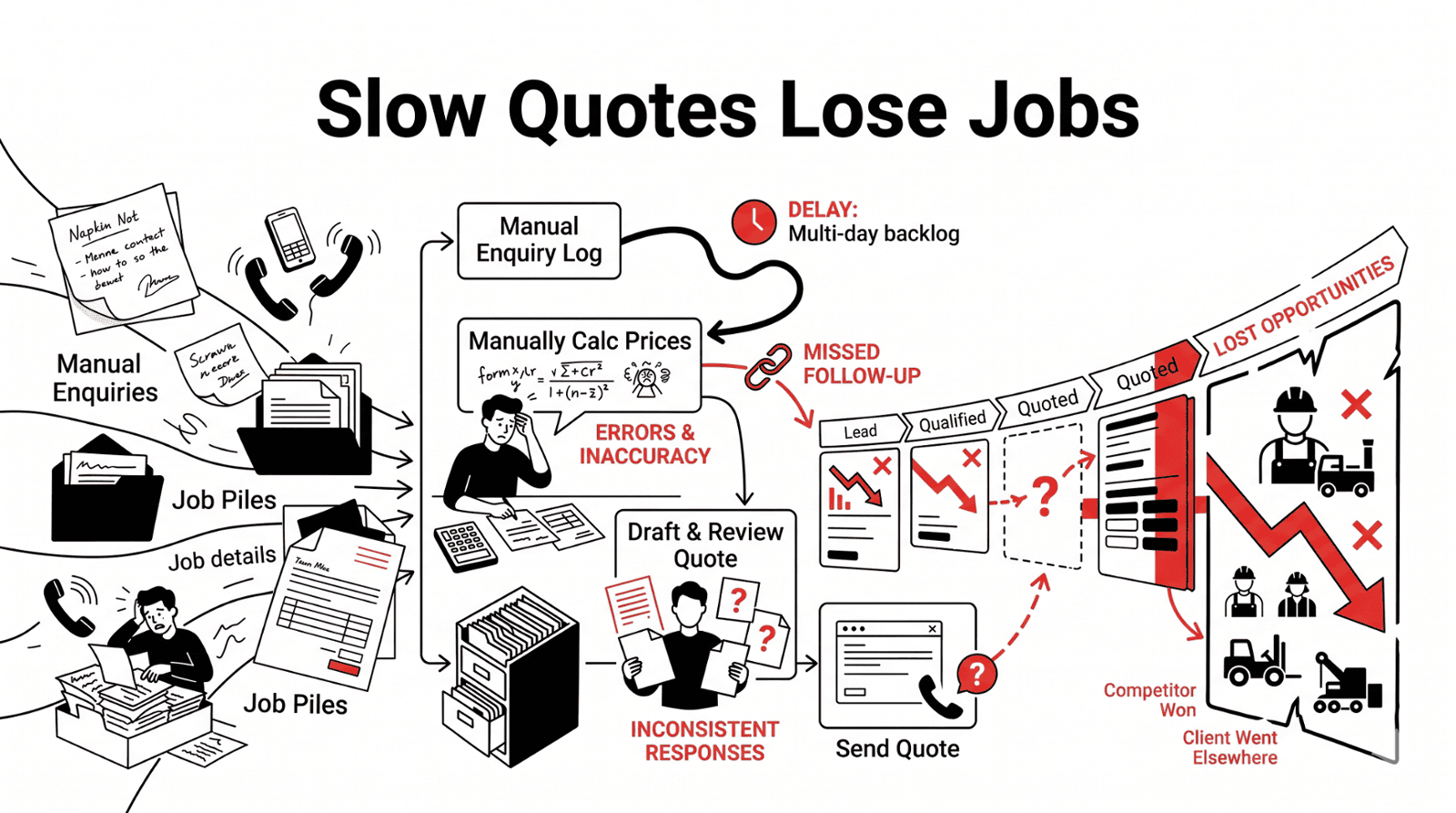
A busy trades business sends dozens of quotes per week[cite: 1449]. Each requires gathering information, estimating materials and labour, formatting the document, and getting it out the door fast[cite: 1450]. Without a system, this process is slow, inconsistent, and prone to losing jobs simply because a competitor arrived faster[cite: 1451, 1453].
Seasonal Demand Spikes
Canadian trades businesses deal with dramatic seasonal demand swings[cite: 1455]. An HVAC business that is steady most of the year can explode in volume during October[cite: 1457]. Managing a sudden surge without a system means leads get lost and response times balloon[cite: 1458].
Referral and Repeat Business
The industry runs heavily on referrals and repeat business built on memory, trust, and consistent follow through[cite: 1461, 1463]. Without a CRM, relationship history lives in someone's head[cite: 1464]. When a repeat client calls, there is no immediate way to pull up their history[cite: 1465].
The Sales to Operations Gap
The person selling the job is often different from the person doing the job[cite: 1468]. Without a system linking these functions, things fall between the cracks. Jobs get booked but not scheduled, and materials arrive late[cite: 1470].
Section 02
How Zoho CRM Addresses These Challenges
The Automated Quote Workflow
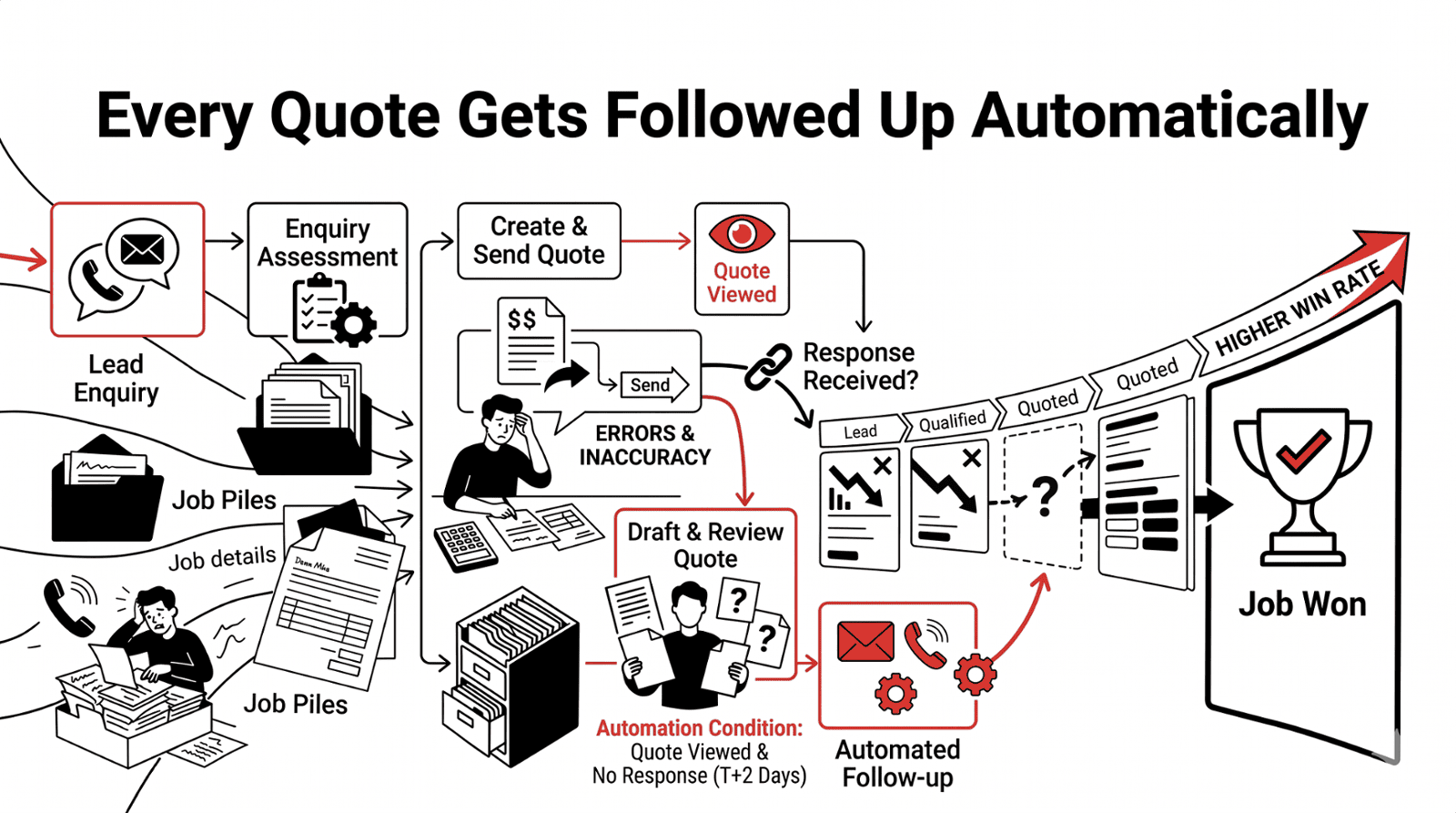
Zoho CRM's quoting capabilities, particularly when paired with Zoho Books, allow trades businesses to build a standardised, fast, and professional quote workflow that dramatically reduces the time from enquiry to proposal[cite: 1475].
Enquiry Logging
An enquiry comes in via phone, web form, or referral and is automatically logged in Zoho CRM with the client's details, job type, and location[cite: 1477].
Estimator Notification
The assigned estimator is notified immediately with a task to complete a site assessment or phone qualification call[cite: 1478].
Template Customisation
After the assessment, the estimator selects from pre-built quote templates in Zoho CRM tailored to different job types and customises the scope and pricing[cite: 1479].
One Click Send
The quote is generated, branded, and emailed to the client directly from Zoho CRM in a single click[cite: 1480].
Automated Tracking
Zoho CRM automatically tracks whether the quote has been opened by the client and fires a follow up task when it has been viewed but not responded to within 48 hours[cite: 1481].
Operational Handoff
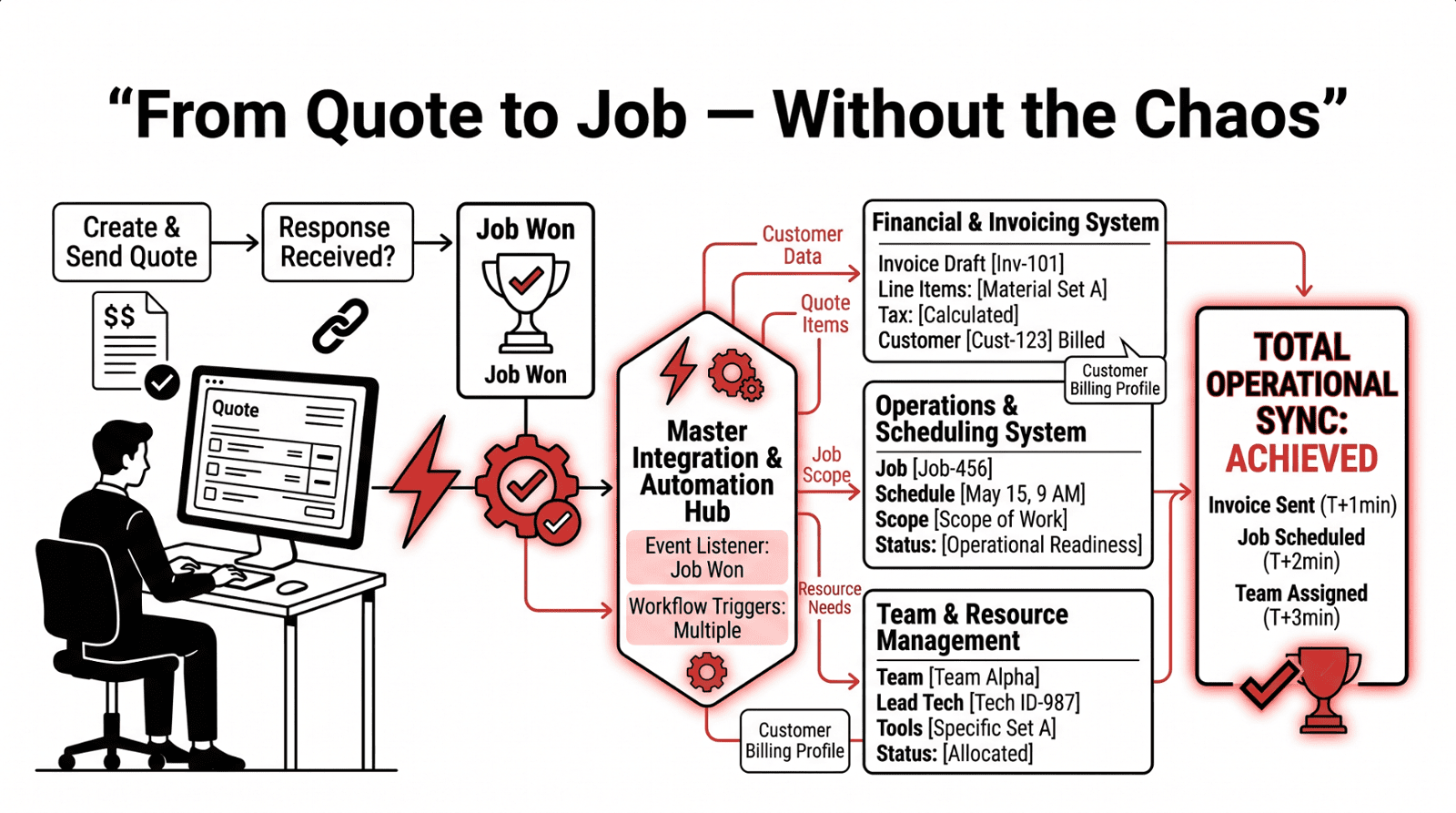
When the client accepts, a single click converts the quote to a deposit invoice in Zoho Books and notifies the operations team[cite: 1482].
For a trades business sending 30 quotes per week, this workflow typically reduces the time spent per quote by 40 to 60 percent. The automated follow up on sent quotes alone recovers jobs that would otherwise have gone cold[cite: 1483].
Real Example
A roofing contractor in Ontario implemented Zoho CRM's quote workflow and reduced average quote to send time from 4.5 hours to under 90 minutes. In their first spring season, quote follow up automation helped them recover 11 jobs that had gone cold, representing approximately $68,000 CAD in additional revenue[cite: 1484].
Section 03
Triage Automation and Capacity Management
Zoho CRM's automation capabilities make surge management systematic rather than chaotic[cite: 1486]. During peak seasons, the system keeps operating at the same quality level regardless of incoming volume[cite: 1487].
Key automation features include immediate auto response to every inbound enquiry, acknowledging the request and setting realistic timeline expectations[cite: 1489]. Priority scoring rules flag emergency or high value enquiries for faster follow up. For example, a commercial client reporting a heating failure in January gets a different response priority than a residential client requesting a spring maintenance quote[cite: 1490]. Lead source tracking during surge periods allows you to see whether your surge is coming from Google Ads, referrals, or your Google Business Profile[cite: 1491]. Furthermore, capacity tracking integration ensures that as your job schedule fills up, Zoho CRM automatically updates your quote timelines so clients receive accurate expectations[cite: 1492].
The Relationship Intelligence System
Zoho CRM becomes the institutional memory of your client relationships[cite: 1494]. Every interaction, every job, every call, every complaint, and every compliment is logged and accessible instantly[cite: 1495]. When a client calls to book their annual furnace maintenance, your office team can see their full history, referral record, past equipment concerns, and appointment preferences before the conversation is ten seconds old[cite: 1497, 1498].
Beyond reactive context, Zoho CRM enables proactive relationship management through automated annual service reminders, seasonal outreach campaigns sent via Zoho Campaigns with CASL compliant consent management, and referral tracking to recognize clients who send you business[cite: 1499, 1500, 1501, 1502].
The Integrated Workflow
The real power of Zoho for trades businesses comes from its ecosystem integration[cite: 1505]. Zoho CRM is the front end of a connected business management system that links to Zoho Books for invoicing, Zoho Projects for job management, and Zoho Inventory for materials tracking[cite: 1506]. This integration eliminates the double handling of information that costs trades businesses hours every week, preventing errors and omissions[cite: 1508].
| Without Zoho Integration | With Zoho CRM + Books + Projects |
|---|---|
| Quote accepted, operations notified by phone or text [cite: 1507] | Won deal auto-creates project and deposit invoice [cite: 1507] |
| Deposit invoice created manually in separate system [cite: 1507] | Deposit invoice sent to client within minutes of acceptance [cite: 1507] |
| Job scheduled in paper diary or separate calendar [cite: 1507] | Job created in Zoho Projects with team assignment [cite: 1507] |
| Materials ordered based on memory [cite: 1507] | Job materials checklist attached to project [cite: 1507] |
| Completion invoice created manually [cite: 1507] | Final invoice generated from project, one click [cite: 1507] |
| Client history spread across paper files [cite: 1507] | Full client history in CRM, accessible on mobile [cite: 1507] |
Section 04
Setting Up Zoho CRM for Your Trades Business
Every trades business is different, but there are five key configuration areas that make the biggest difference for businesses in this sector[cite: 1510].
Custom Lead and Contact Fields
You need fields for property type, property address, equipment details, preferred service window, and access instructions[cite: 1513, 1514, 1515, 1516, 1517, 1518]. Zoho CRM's custom fields allow you to add all of these without any coding[cite: 1520].
Job Type Specific Pipelines
A generic pipeline does not reflect reality. You need distinct pipelines for residential service calls, residential project work, commercial maintenance contracts, and commercial project bids[cite: 1523, 1525, 1526, 1527, 1528].
Mobile First Configuration
Your team operates in the field. The mobile app needs to be configured for quick call notes with voice to text, one tap check ins, mobile quote creation, and instant access to client history[cite: 1532, 1533, 1535, 1536, 1537, 1538].
Google Reviews Integration
Zoho CRM can be configured to automatically send a review request to clients three to five days after a completed job[cite: 1542]. This automation can transform your Google Business Profile rating over time[cite: 1543].
Additionally, Zoho Books integrates with Zoho CRM to support all Canadian tax configurations, including GST, HST by province, and PST. Quotes and invoices automatically apply the correct tax rate based on the client's province, and all financial records are structured for year end bookkeeping and CRA compliance[cite: 1546, 1547]. This typically saves between 3 and 6 hours of administrative work per week[cite: 1548].
Section 05
What the First 60 Days Look Like
Here is what the implementation journey typically looks like for a Canadian trades business[cite: 1549].
Week 1 to 2: Setup and Data Migration
Your existing client database is cleaned and imported into Zoho CRM. Custom fields, pipelines, and layouts are configured. Your team is set up with mobile access[cite: 1550, 1551, 1552, 1553].
Week 3 to 4: Quote Workflow Automations
Quote templates are built and connected to Zoho Books. The immediate lead response automation goes live. Your team starts using the system for all new quotes[cite: 1554, 1555, 1556, 1557].
Week 5 to 6: Follow Up Sequences
Follow up sequences for each pipeline type are activated, along with escalation alerts and seasonal service reminder campaigns in Zoho Campaigns[cite: 1558, 1559, 1560].
Week 7 to 8: Reporting and Optimisation
Your management dashboard is configured to show the metrics that matter most. You have your first two weeks of data to review, and the team has adopted the system for daily use[cite: 1562, 1563, 1564, 1565].
Why Now Is the Right Time
The Canadian trades and home services market is going through a meaningful technology adoption shift[cite: 1568]. The businesses winning in this market in 2026 are the ones that respond fastest to enquiries, follow up most consistently, present the most professional quotes, and maintain the strongest client relationships over time[cite: 1570, 1571]. All of those outcomes are systematically achievable with the right CRM setup[cite: 1572]. The businesses that implement this infrastructure now are building a structural advantage that will compound over years[cite: 1573].
The trades industry has always been built on reputation, relationships, and reliability. Those fundamentals do not change with a CRM, but a CRM makes it dramatically easier to deliver on all three at scale[cite: 1580, 1581]. When every lead is followed up consistently, every quote is sent quickly, and every won job flows smoothly into operations, the overall quality and consistency of your service goes up[cite: 1582]. Clients notice. Referrals increase. The administrative weight lifts[cite: 1583]. That is what the right CRM does for a trades business, and we are here to help you build it[cite: 1584].
Ready to See What This Looks Like?
Book a Free Trades-Specific Zoho CRM Demo
We offer a free 45 minute Zoho CRM demo specifically designed for Canadian trades and home services businesses. We will show you the system configured for a business like yours so you can see exactly what it would look like in practice[cite: 1576, 1577].