Stop relying on memory and willpower to follow up with your leads. This guide shows you exactly how to build a fully automated follow up system inside Zoho CRM that works even when your team is busy, tired, or on vacation.
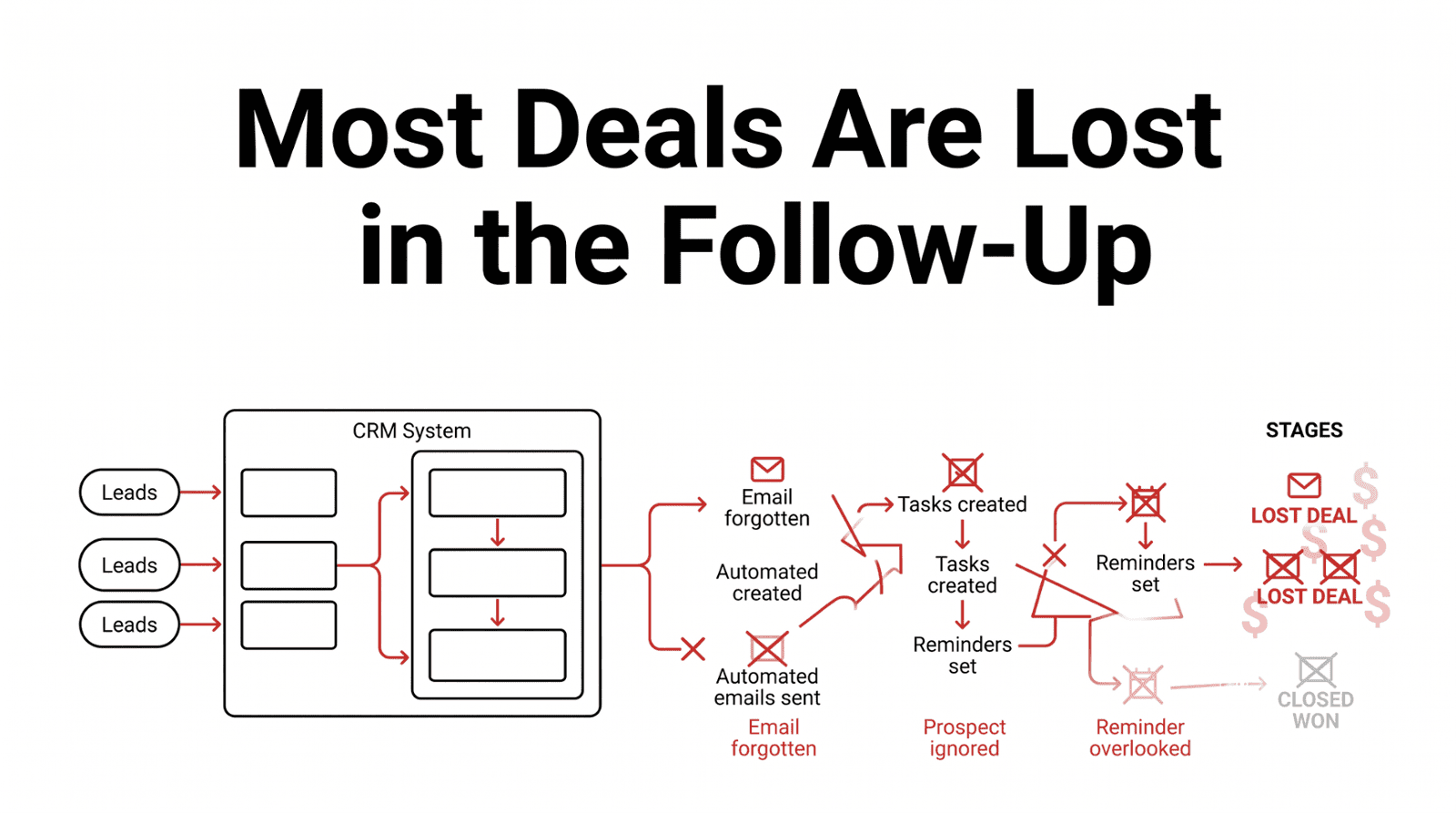
Ask any Canadian sales manager what their biggest operational headache is, and you will hear the same answer nine times out of ten, which is follow up. Not the first call, as that one usually happens. Not the initial proposal, as that gets sent. But the second follow up, the third, the gentle nudge two weeks after the proposal, and the re engagement email three months later when the prospect's situation may have changed.
These are the touches that win deals, and they are the ones that fall apart most consistently in businesses that rely on their sales team's memory and personal discipline to execute them. The solution is not hiring more disciplined salespeople. The solution is building a system that makes the follow up happen automatically, every time, without anyone having to remember to do it.
That is exactly what Zoho CRM's workflow automation engine is designed for, and in this guide, we are going to walk through how to build it, step by step, for a Canadian small business context. By the time you finish reading this, you will have a complete blueprint for a follow up automation system you can implement inside Zoho CRM. Some of it you will be able to set up yourself. Some of it will benefit from a certified Zoho partner's help. Either way, you will know exactly what to build and why.
Section 01
Why Most Canadian Businesses Are Still Following Up Manually
Before we build anything, it is worth understanding why manual follow up persists even in businesses that know better. The honest answer is inertia combined with underestimation. Most business owners know they should have a more systematic follow up process. But because the cost of manual follow up is diffuse, a deal lost here, a lead forgotten there, it never feels urgent enough to fix today. There is always something more pressing.
The second reason is that many businesses that have tried to automate follow up have had a bad experience. They set up a basic email sequence, it sent at the wrong time or with the wrong content, a client complained, and automation got switched off entirely. The lesson they took away was that automation is risky, when the real lesson was that it was misconfigured.
Done well, sales automation does not feel robotic or impersonal to your prospects. It feels like your business is exceptionally attentive and on top of things. The key is building sequences that are contextual, appropriately timed, and designed to add genuine value at each touchpoint, not just to check a follow up box.
Section 02
The Anatomy of a High Performing Follow Up System
Before touching any settings inside Zoho CRM, it is worth mapping out what a complete follow up system actually looks like. Think of it as four distinct layers, each serving a different part of the sales journey.
Layer 1: Immediate Response
Minutes 0 to 60. Ensure every single lead receives an immediate acknowledgement and gets assigned to the right salesperson.
Layer 2: Primary Follow Up
Days 1 to 14. Five to seven touches across multiple channels to provide value and move the conversation forward.
Layer 3: Post Proposal
Days 1 to 21. Keeps gentle, value adding contact alive throughout the decision window after a proposal is sent.
Layer 4: Long Term Nurture
Months 1 to 12+. Sophisticated nurture sequences that keep your business top of mind for leads that are not ready today.
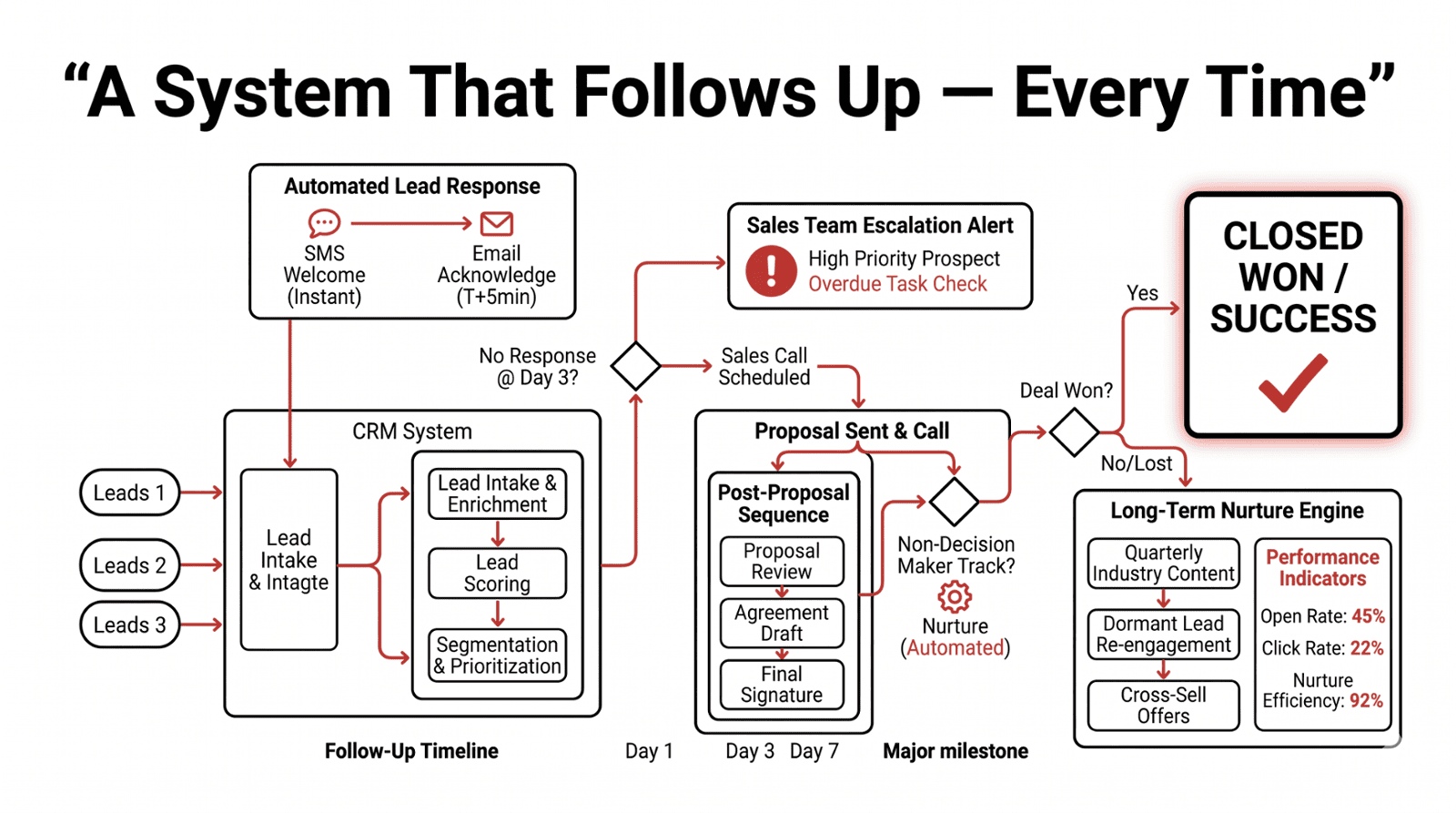
The moment a lead enters your system from a web form, an ad, a phone call, or any other source, the clock starts. Research consistently shows that lead conversion rates drop dramatically after the first hour. The goal of Layer 1 is to ensure that every single lead, regardless of when they come in, receives an immediate acknowledgement and gets assigned to the right salesperson within minutes. What this looks like in practice is a prospect fills out your website contact form at 10:47 PM on a Tuesday. Within three minutes, they receive a professionally written email that acknowledges their enquiry, tells them what to expect next, and perhaps includes a useful resource relevant to what they asked about. By 9:00 AM the following morning, their assigned salesperson has a task waiting in their Workqueue with full context on the lead. No manual effort is needed, and there is no Monday morning triage of weekend enquiries.
The primary sequence is the core of your follow up system, which is the sequence of touches that happens between the first contact and the point where a prospect either converts to a qualified opportunity or is marked as not currently interested. A well designed primary sequence typically includes five to seven touches across multiple channels, including email, task based phone calls, and where appropriate, a LinkedIn connection or a text message. Each touch has a specific purpose to provide value, to move the conversation forward, or to surface an objection that can be addressed.
The period after a proposal is sent is when most deals are won or lost, and it is the phase where follow up most often breaks down. Your prospect has your proposal and they are thinking about it, possibly evaluating competitors, possibly waiting for internal approval, or possibly just busy. Without a post proposal automation sequence, many salespeople send one follow up email and then wait passively for a response that may never come. A proper post proposal sequence keeps gentle, value adding contact alive throughout the decision window without being aggressive or annoying.
Not every lead is ready to buy now. In fact, research suggests that roughly 80 percent of leads that do not convert immediately will eventually buy from someone, often six to twelve months after the initial enquiry. Without a long term nurture sequence, those leads simply disappear from your pipeline and end up buying from whoever stayed in touch. Zoho CRM's workflow engine combined with Zoho Campaigns allows you to build sophisticated long term nurture sequences that keep your business top of mind for leads that are not ready today, so that when they are ready, you are the obvious first call.
Section 03
Building Your Automation System in Zoho CRM
Now let us get into the actual build. This section covers the specific steps to configure each layer of your follow up automation inside Zoho CRM.
Set Up Your Lead Sources and Entry Points
Before you can automate follow up, every lead source needs to be connected to Zoho CRM so leads enter the system automatically. Manual data entry is a failure point, as if someone has to copy a lead from an email into the CRM, there will be delays and omissions. Every lead source should pass a Source field value into Zoho CRM automatically, so you always know where each lead originated. This is essential for later analysis of which channels are worth investing in.
Build Your Lead Assignment Rules
Once a lead enters the system, it needs to be assigned to the right salesperson immediately. Zoho CRM's assignment rules allow you to route leads based on any criteria you define, including geography, lead source, product interest, company size, or a simple round robin rotation. The key principle here is that no lead should ever sit unassigned in Zoho CRM for more than a few minutes. Assignment rules make this automatic.
Configure the Immediate Response Workflow
This is the workflow that fires the moment a new lead is created. It should accomplish three things, which are acknowledging the lead with a professional email, creating an assignment notification for the salesperson, and setting a follow up task due within four business hours. Inside Zoho CRM, navigate to Setup, then Automation, then Workflow Rules, and create a new rule triggered on Lead Creation.
CASL Compliance Note for Canadian Businesses
Your immediate acknowledgement email should confirm receipt of the enquiry and set expectations, and it should NOT be a marketing email or include promotional content unless you have obtained explicit consent. The initial response to an inbound enquiry is considered a transactional message under CASL and does not require consent. However, any subsequent marketing emails, including newsletters, promotional offers, and product announcements, require documented express consent. Build your consent capture into the lead intake workflow from day one.
Section 04
The Primary and Post Proposal Sequences
Build the Primary Follow Up Sequence
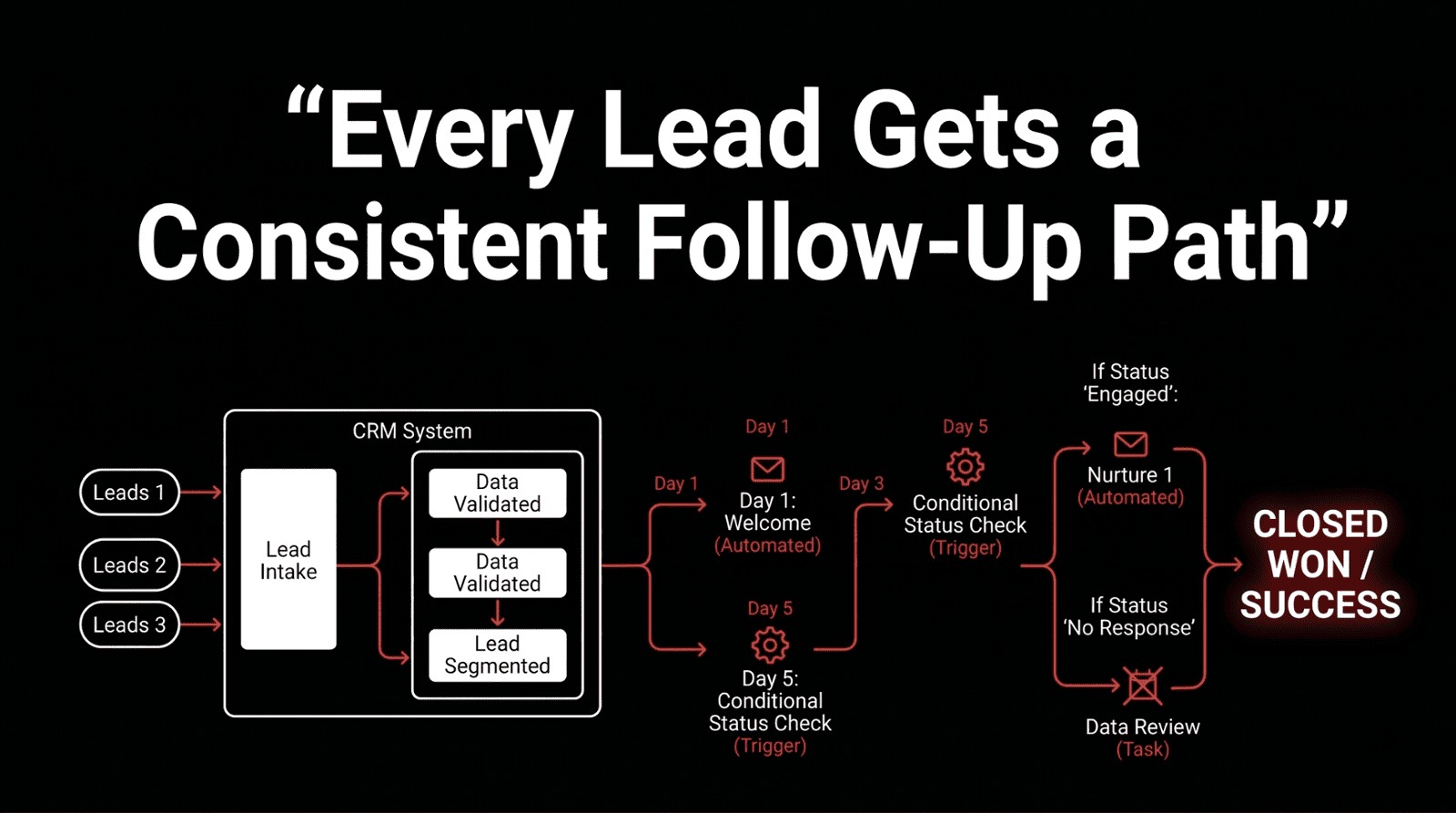
This is the multi touch sequence that runs from lead creation to qualification. Each automated email in this sequence should be written as a genuine communication, not a broadcast. It should reference the prospect's specific enquiry, offer something of value like a guide, a case study, or a relevant tip, and make a clear but gentle ask for a conversation. Inside Zoho CRM, these email actions are configured as time based workflow actions within a single workflow rule. Each action fires only if the lead has not yet been moved to a qualified or converted status, meaning if your salesperson books a call and converts the lead on Day 2, the remaining touches are automatically cancelled.
Set Up Escalation and Inactivity Alerts
Even with automation, you need a safety net for deals that are getting no traction. Escalation alerts fire when a lead or deal has been inactive for longer than a defined threshold, giving managers visibility into stuck prospects before they go completely cold. These rules ensure that nothing sits forgotten in your pipeline indefinitely. They are particularly valuable during busy periods when salespeople are focused on closing active deals and earlier stage leads drift.
Build the Post Proposal Follow Up Sequence
When a deal is moved to the Proposal Sent stage in Zoho CRM, a new automated sequence should trigger. This sequence is distinct from the lead nurture sequence, as it is more focused, more specific to the proposal content, and designed around a shorter decision window. The key principle of this sequence is to add value at each touch, not just ask if they have made a decision yet. Each automated email should give the prospect something genuinely useful, like a number, a case study, or an insight, that makes them more confident about moving forward.
Configure the Long Term Nurture System
For leads that go through your primary sequence without converting, do not delete them. Move them to a long term nurture status and enrol them in a Zoho Campaigns sequence that delivers value over months, not days. The tone of long term nurture should be educational and helpful, not promotional. The goal is to stay visible and respected so that when the prospect's situation changes and they are ready to buy, you are the first name that comes to mind. Long term email nurture sequences require documented express consent under CASL. Ensure that every contact enrolled in a Zoho Campaigns sequence has a consent record in their CRM profile showing when, how, and for what they consented to receive marketing communications. Zoho CRM's consent management fields make this straightforward to implement from the start.
Section 05
Measuring Performance and Common Mistakes
Once your automation is live, the work shifts from building to measuring and optimising. Zoho CRM's reporting tools give you everything you need to understand how your follow up system is performing. Build a simple dashboard in Zoho CRM with these metrics visible at a glance. Review it weekly for the first three months. By month four, you will have enough data to start making meaningful optimisations to your sequences based on what is actually working for your specific audience.
Common Mistakes to Avoid
Having helped many Canadian businesses build follow up automation systems, here are the most common mistakes we see, and how to avoid them.
Building Before Mapping
Jumping into workflow configuration before you have clearly mapped your actual sales process in words and on paper is the single most common mistake. Build your workflow on paper first.
Over Automating Too Fast
Start with the highest impact automations, which are the immediate response workflow and the primary follow up sequence. Adding too much automation at once makes troubleshooting difficult.
Writing Generic Emails
Automation does not mean impersonal. Every email in your sequence should be written as if a real human sent it to a specific type of prospect, because that is exactly what your prospect should experience.
Ignoring CASL
For Canadian businesses, CASL compliance needs to be built into your automation architecture from day one, not added as an afterthought.
Section 06
When to Work With a Certified Zoho Partner
Everything described in this guide can, in theory, be configured by a technically capable person with time and patience. In practice, building a complete, CASL compliant, well structured follow up automation system inside Zoho CRM typically takes an experienced Zoho partner two to three days, and an inexperienced internal team two to three months, with multiple rounds of troubleshooting.
More importantly, a certified Zoho Premium Partner brings pattern recognition from dozens of implementations. We know which workflow configurations cause problems down the road. We know which email sequences convert for which industries in the Canadian market. We know how to build for scalability so that when your team grows from five to fifteen people, your automation architecture does not need to be rebuilt from scratch. The most cost effective approach for most Canadian SMBs is a hybrid where you work with a Zoho partner for the initial architecture and build, then manage ongoing optimisations internally with occasional partner support.
Final Thoughts
Sales follow up automation is not about replacing the human relationship in your sales process. It is about making sure the human relationship always happens, that no lead is ever forgotten, no follow up ever missed, and no deal ever lost simply because someone was too busy to send an email that day.
Zoho CRM gives Canadian businesses the tools to build this system. Building it correctly, with CASL compliance built in and your specific sales process reflected in every workflow, is what turns the tool into a genuine competitive advantage. Your competitors are building this system. The question is whether you build yours first.
Ready to Automate?
Book a Free Follow Up Automation Scoping Call
We will map your ideal Zoho CRM follow up system in a single 45 minute session, then give you a clear plan and a fixed price implementation quote.